
前因后果
在使用新Outlook客户端接收爬虫自动发送的数据成功运作了一段时间,但由于新Outlook客户端同步接收邮件延迟明显,又换回了旧Outlook客户端。但在旧客户端上邮件文本内容正常接收,但附件不显示。一开始以为是客户端设置的问题,更改了很多选项都没法正常显示,又重新看了脚本代码。
原因分析
Python编写脚本定时发送邮件,常用smtplib和email两个模块,前者负责邮件投递,后者使用MIME类型构造邮件对象。
MIME (Multipurpose Internet Mail Extensions) 是描述消息内容类型的标准,用来表示文档、文件或字节流的性质和格式。
MIME类型通用结构:
type/subtypeMIME 的组成结构非常简单,由类型与子类型两个字符串中间用 / 分隔而组成,不允许有空格。type 表示可以被分多个子类的独立类别,subtype 表示细分后的每个类型。常见两种默认类型:text/plain 表示文本文件的默认值。application/octet-stream 表示其它二进制数据或特定文件的默认值。
常见子类型表示文件:text/plain:纯文本文件text/html:HTML 文件image/jpeg:JPEG 图像文件image/png:PNG 图像文件audio/mpeg:MP3 音频文件video/mp4:MP4 视频文件application/json:JSON 数据文件application/xml: XML 数据格式application/pdf: PDF 文档application/zip: ZIP 压缩文件
对于邮件体来说,常用的有纯文本TEXT和超文本HTML,如果需要混合多种类型使用,如带内嵌图片或者附件,则需要构造multipart类型。multipart类型邮件体被分为多个段,每个段又包含段头和段体两部分,这两部分之间也以空行分隔。常见的multipart类型有三种:multipart/mixed, multipart/related和multipart/alternative,它们之间的层次关系可归纳为下图所示:
MIME 消息能包含文本、图像、音频、视频以及其他应用程序专用的数据。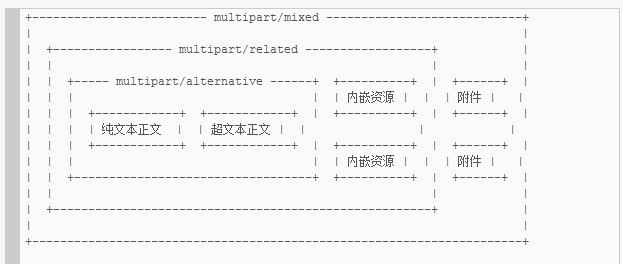
如果在邮件中要添加附件,必须定义multipart/mixed段;如果存在内嵌资源,至少要定义multipart/related段;如果纯文本与超文本共存,至少要定义multipart/alternative段。
在Python中,MIMEMultipart类默认值为'mixed',但自己写的脚本却设置成'alternative'。
class MIMEMultipart(MIMEBase):
    """Base class for MIME multipart/* type messages."""

    def __init__(self, _subtype='mixed', boundary=None, _subparts=None,
                 *, policy=None,
                 **_params):
        """Creates a multipart/* type message.

        By default, creates a multipart/mixed message, with proper
        Content-Type and MIME-Version headers.

        _subtype is the subtype of the multipart content type, defaulting to
        `mixed'.

        boundary is the multipart boundary string.  By default it is
        calculated as needed.

        _subparts is a sequence of initial subparts for the payload.  It
        must be an iterable object, such as a list.  You can always
        attach new subparts to the message by using the attach() method.

        Additional parameters for the Content-Type header are taken from the
        keyword arguments (or passed into the _params argument).
        """
        MIMEBase.__init__(self, 'multipart', _subtype, policy=policy, **_params)

        # Initialise _payload to an empty list as the Message superclass's
        # implementation of is_multipart assumes that _payload is a list for
        # multipart messages.
        self._payload = []

        if _subparts:
            for p in _subparts:
                self.attach(p)
        if boundary:
            self.set_boundary(boundary)
解决方法
如果邮件携带了附件,且类型设置为'alternative'或'related'的情况下,现代邮件客户端一般也能正确识别附件并显示。然而在RFC1341中,当指定了Content-Type:multipart/alternative时,邮件客户端如果觉得自己不能够展示附件相应的类型,可以选择不显示。在旧版outlook客户端上,如果Content-Type,附件就无法显示,新OUTLOOK又能正确显示。
本文由 slocksu 创作,采用 知识共享署名4.0 国际许可协议进行许可。
本站文章除注明转载/出处外,均为本站原创或翻译,转载前请务必署名。